ChatGPT Without Login: How to Use It With No Account in 2026
ChatGPT without login works on chatgpt.com in guest mode: type with no account, but no saved history, and images, deep research and uploads stay locked. Checked November 10, 2026.
 12 min read

You can use ChatGPT without login: open chatgpt.com, click into the “Ask ChatGPT” box and type. No account, email address or payment is asked for in guest mode. We tried it again on November 10, 2026, in an ordinary browser, and the answer came back in a few seconds with no sign-in screen in between.
To use ChatGPT without login, open chatgpt.com and type in the prompt box: guest mode needs no account, email or payment (tested November 10, 2026). Chats are not saved, and image creation, deep research and file uploads stay locked until you log in. For another AI chat with no account, Duck.ai and Gemini both work with no account.
Summarize this article with:
 ChatGPT
 Perplexity
 Claude
 Grok
Guest mode comes with strings attached. Your chat is gone when you leave it, you can only run one conversation at a time, and image creation, deep research and file uploads stay grayed out until you log in. Below: the steps, what the menu unlocks or locks, what OpenAI says about models and limits, what happens to your messages, and what to do when the site asks you to log in anyway. If you would rather skip ChatGPT altogether, our guide to free AI tools with no sign-up covers the other options.
How to use ChatGPT without logging in
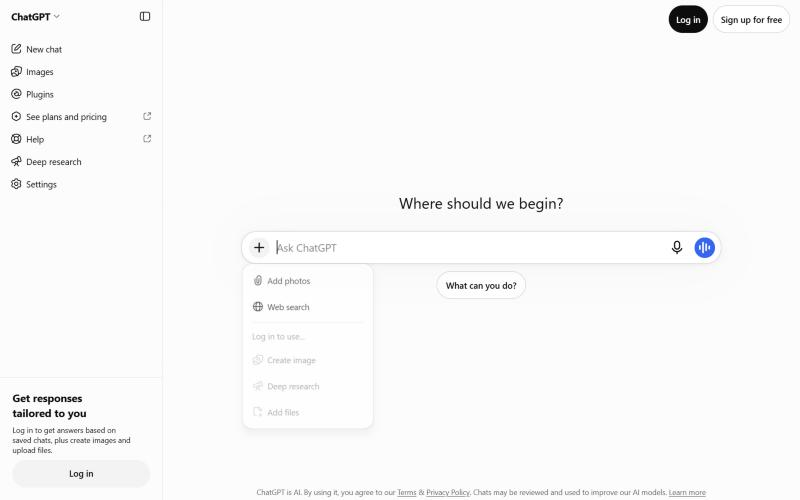
It takes under a minute on a computer or a phone. The one rule is to use the official address instead of a lookalike site.
- Go to chatgpt.com in any browser. Use the official address only.
- Ignore the “Log in” and “Sign up for free” buttons in the top right corner. They do not block the page.
- If a cookie banner appears, decline the non-essential cookies. We did on November 10 and the chat worked anyway.
- Click the “Ask ChatGPT” box, type your question and press Enter.
- Keep going in the same window: only one conversation is allowed at a time.
- Copy what you want to keep before you close the tab or click “New chat”, because guest chats are not saved.
Nothing sits behind a payment screen. If a site asks for a card number to “unlock ChatGPT”, you are not on OpenAI’s service. The only guest mode that counts lives on chatgpt.com.
What we saw in guest mode on November 10, 2026
The home page opens on “Where should we begin?” and the prompt box, with “Log in” and “Sign up for free” tucked in the top right corner. On a computer, the left sidebar lists New chat, Images, Plugins, plans and pricing, Help, Deep research and Settings, and a card at the bottom says that logging in gets you answers based on saved chats, plus image creation and file uploads. Asking a question and reading the reply needs nothing else.
To check, we sent: “Give me three quick dinner ideas for tonight, one sentence each.” ChatGPT replied within seconds with a short list of three ideas and no login prompt in between. The prompt box keeps working across follow-ups in the same chat.
The plus menu tells the rest of the story. “Add photos” and “Web search” appear unlocked, while “Create image”, “Deep research” and “Add files” sit under a “Log in to use” label. We did not upload a photo or run a web search during this test, so treat those two as unconfirmed until you try them, and know that OpenAI publishes no limit for either. The microphone and voice buttons are visible beside the box, and we did not test them either. One more line worth reading, printed at the bottom of the page: chats may be reviewed and used to improve OpenAI’s models.
Logged out or free account: what changes
| Feature | Logged out (guest) | Free account |
|---|---|---|
| Ask a question and read the answer | Yes, tested November 10 | Yes, with unlimited text chats subject to abuse guardrails |
| Model | Not published by OpenAI | GPT-6 per the pricing page, GPT-5.6 Luna per the help center (see below) |
| Chat history | No, current browser session only, one chat at a time | Yes |
| Web search | Offered in the plus menu (not tested) | Yes |
| Add photos | Offered in the plus menu (not tested) | Yes, with a usage limit |
| Create images | Grayed out, login required | Yes, with a usage limit |
| Deep research | Grayed out, login required | Yes, limited |
| Upload files | Grayed out, login required | Yes, with a usage limit |
| Custom instructions | No, accounts only | Yes |
| Export or share chats | No, accounts only | Yes |
| Ads | None seen in our test | May appear in some countries, per OpenAI’s help center |
| Price | $0 | $0 |
The detail that trips people up is the “New chat” button. Starting a new chat while logged out makes the previous one inaccessible, according to OpenAI’s help center, and chats stay available only for the current session in the same browser. If you create an account afterward, only your latest conversation shows up in the sidebar. For a quick question none of this matters. For a project that runs over several days, the missing history gets old fast.
Which model and how many messages without an account?
OpenAI does not say which model answers logged-out visitors, and it publishes no message cap for them. We found no official number for guest mode and we are not going to make one up, so be wary of any page that quotes an exact guest limit. Asking the chatbot its own name proves nothing either: on October 23, 2026, it called itself “GPT-6”, but chatbots are unreliable narrators of their own version.
For the free account, two current OpenAI pages say similar but not identical things. The pricing page, read November 10, headlines unlimited text chats with GPT-6 for the Free plan (its comparison table names GPT-6 Luna), subject to abuse guardrails. The help center’s Free tier article, updated two days earlier, names GPT-5.6 Luna as the default and warns that the default model and the limits can change. The practical reading: the free tier runs a “Luna” model, and the version number depends on which page you read.
On the limits side, the pricing page classes messages with uploads, image creation, voice chats, deep research, memory and Codex access as limited on the free plan. It also lists a 27K context window for the fast mode, about 12 pages of text of input, after which ChatGPT tells you the chat is full and offers a fresh one. Those numbers describe the free account, not guest mode, for which OpenAI publishes nothing.
When ChatGPT asks you to log in anyway
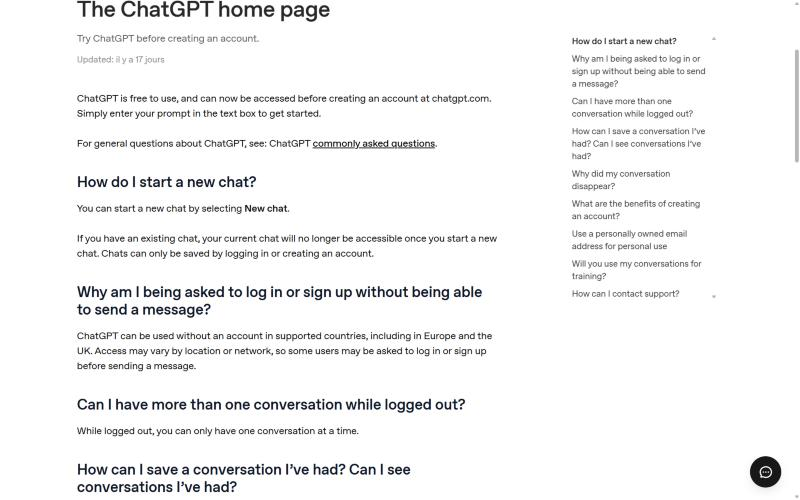
OpenAI’s help center says logged-out use works in supported countries, Europe and the UK included, but that access may vary by location or network, so some visitors are asked to log in or sign up before they can send a message. It does not list the reasons. An older version of that article left Europe out, which is no longer the case. From France, guest mode worked in our tests on October 4, October 23 and November 10, 2026.
If you hit a login wall with no way to type, a few quick things are worth trying, though OpenAI does not promise any of them: reload in a private window, switch browsers, move from Wi-Fi to mobile data, or turn off a VPN. If none of that works you have two exits left, a free account or a different AI chat with no account. Declining the optional cookies is not the problem: we did it during the November 10 test.
Privacy: what happens to a guest chat
Having no account is not the same as leaving no trace. According to OpenAI’s help center, whether your chats train its models by default depends on your location and settings, and it recommends not sharing sensitive information. The banner at the bottom of the home page says the same thing in one line, and the pricing page says opting out is possible on every plan.
To opt out, open Settings from the sidebar and turn off “Improve the model for everyone” under Data controls. OpenAI notes the setting is stored in your browser, so check it again if you clear your data or switch devices. Whatever the setting, keep passwords, ID numbers, medical details and client data out of a guest chat.
What a free account unlocks
Per OpenAI’s help center, a free account adds web search, data analysis, image and file uploads, existing GPTs, image creation and a 500 MB library. Everyday text chats are unlimited, subject to abuse guardrails, while files, images, voice and data analysis each have their own cap, and ChatGPT tells you when you reach one. Ads may appear in some countries.
Paid plans raise those limits. If you wonder whether Go or Plus is worth it, our ChatGPT Free vs Plus comparison lays out what each tier changes. The guide on getting ChatGPT Plus for free covers the official offers that exist right now. Our advice: start as a guest, and sign up only when a specific limit keeps getting in your way.
Why “unlimited free ChatGPT” sites deserve suspicion
Search results for this topic are full of pages promising “unlimited ChatGPT, free, no sign-up”. We have not tested them one by one, so we will not name them. Only chatgpt.com is OpenAI’s own service, and a third-party site is under no obligation to tell you which model it runs or what it does with your messages. Many show ads or serve as a funnel to a paid subscription.
A simple rule sorts most cases: everything OpenAI gives away for free lives on its own domain, and a site charging you to “unlock” ChatGPT is not official. The API is a separate product run from a developer account, and guest mode on chatgpt.com gives no access to it.
Another AI chat with no account if ChatGPT turns you away
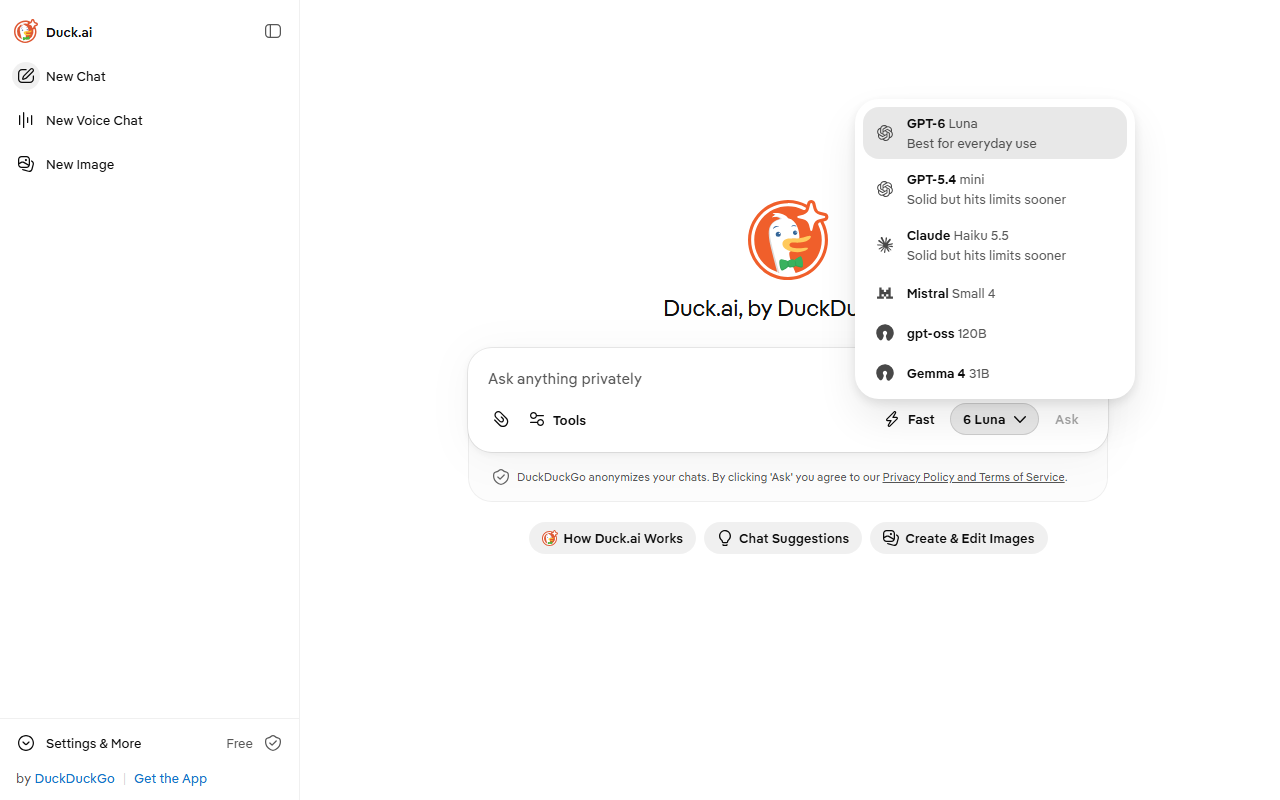
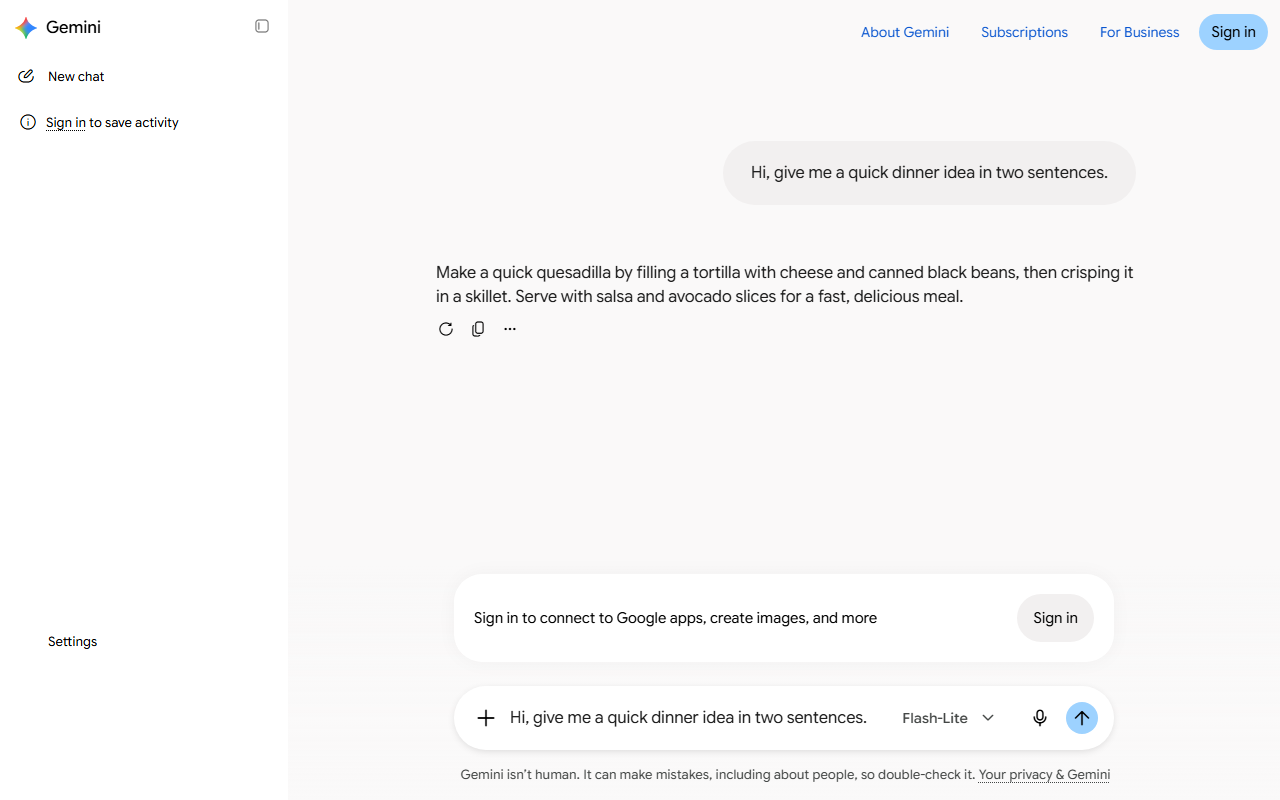
When guest mode asks you to log in or its limits slow you down, other assistants answer without an account. On November 10, 2026, Duck.ai from DuckDuckGo offered six free models with no sign-up, GPT-6 Luna selected by default, and Gemini answered with no Google account using its Flash-Lite model, keeping history and images for signed-in users. Our free AI tools with no sign-up guide covers each tool and the limits we read the same day, and we refreshed it alongside this page.
Frequently asked questions
Can I use ChatGPT without an account?
Yes. Guest mode on chatgpt.com lets you type with no account, email address or payment, and we confirmed it from France on November 10, 2026. The catch: your chat is not saved, only one conversation runs at a time, and image creation, deep research and file uploads need a login.
How do I use ChatGPT without logging in?
Go to chatgpt.com, ignore the Log in and Sign up for free buttons, decline the optional cookies if a banner appears, click the Ask ChatGPT box and type your question. Copy any answer you want to keep before closing the tab or starting a new chat.
How do I search on ChatGPT without logging in?
Ask your question in the prompt box. The plus menu also shows a Web search option as available when logged out. We did not run a web search during our November 10 test, so for answers with cited sources a search tool that lists its sources is the safer pick.
Is ChatGPT really free without logging in?
Yes. Guest mode is free and no card is requested. A free account is also $0, with separate limits on uploads, images, voice and deep research. Only the paid plans such as Go, Plus and Pro cost money.
Why does ChatGPT ask me to log in when I only want to type?
OpenAI says access without an account can vary by location or network, so some visitors are asked to log in or sign up before sending a message. Try a private window, another browser or another network. If the wall stays, create a free account or use another AI chat with no account.
Which ChatGPT model do I get without an account?
OpenAI does not say. For the free account, its pricing page read on November 10, 2026 promises unlimited text chats with GPT-6, while its help center names GPT-5.6 Luna as the default and says defaults can change.
Is there a message limit for logged-out ChatGPT?
OpenAI publishes no cap for logged-out visitors. It does say you can only have one conversation at a time. Treat any specific number from a blog as a guess.
Can I create images or upload files without an account?
No for image creation and file uploads: the plus menu grays them out under a Log in to use label (November 10, 2026). Add photos and Web search appear unlocked in the same menu, but we did not test them.
Are my ChatGPT conversations saved without an account?
No. Chats stay available only for the current session in the same browser, and starting a new chat makes the previous one inaccessible. If you log in or create an account, only the latest thread carries over.
Does ChatGPT use my chats for training when I am logged out?
It depends on your location and settings, according to OpenAI, which recommends not sharing sensitive information. The Improve the model for everyone setting lets you opt out. It is stored in your browser and resets if you clear your data.
Is there a free ChatGPT API with no sign-up?
Not through guest mode: chatgpt.com gives no access to the API, which is a separate product run from a developer account and billed by usage. We found no official API access that needs no account.
Can two people share a ChatGPT account instead?
OpenAI’s Terms of Use say you may not share your account credentials or make your account available to someone else. If a friend or family member only wants to try ChatGPT, they can use guest mode on their own device.
What is the best free AI chat without sign-up?
It depends on the job. ChatGPT guest mode suits a quick one-off question, Duck.ai suits privacy and model choice, and Gemini suits a fast answer with no Google account. None of them replaces an account if you need saved history.